Cue01
Game audio
Your game is never touched.
Sidestage captures only the apps you pick. Your game is never captured, routed or processed, so footsteps and gunshots keep their exact position and timing.
Sidestage plays the apps you choose, like Spotify, a podcast or Discord, in 3D around your head on headphones. Your game's audio is never captured or processed, so footsteps and gunshots keep their exact position and timing.
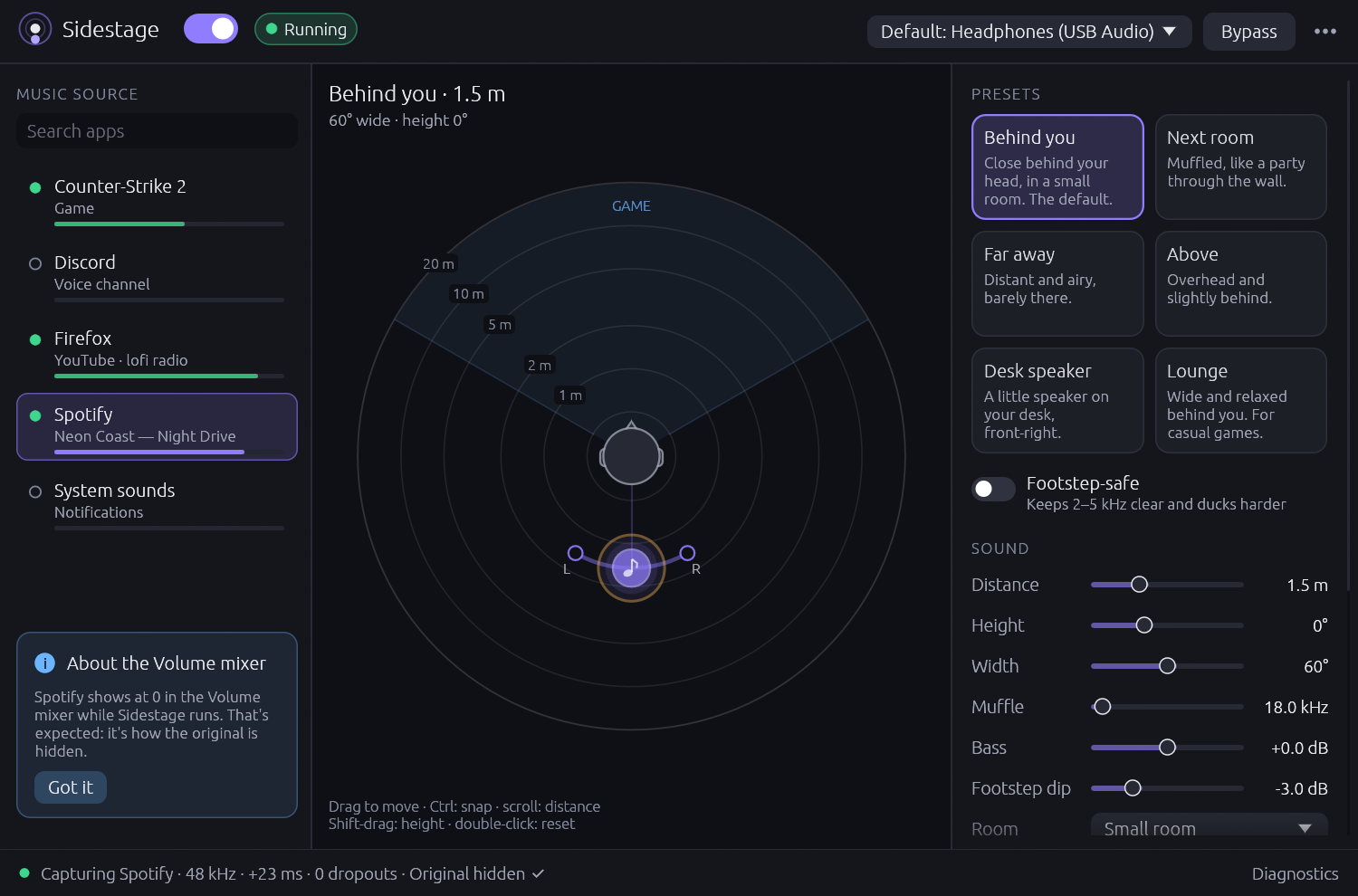
Coming nextUp to 8 apps at once, each in its own spot, arrives in the next update. Version 0.1 places one app.
01 · Hear it in your browser
Press play: a lo-fi loop comes from the violet puck and a friend murmurs from the coral one. Drag them anywhere around your head. The game's footsteps cross in front of you and skip the 3D stage completely, the same way your real game skips Sidestage.
Drag a puck, or click the radar to move the selected one (Ctrl snaps to 15°). Keyboard: focus a puck, then use the arrow keys (Shift for small steps), Page Up and Page Down for height, Home to reset.
Use headphones. Binaural 3D doesn't work on speakers.
This browser can't play Web Audio, so the sound check stays silent here. The radar still moves.
Music position
Behind you · 1.5 m
60° wide · height 0°
On stage
Sound
An honest note: everything here is synthesized on this page and placed with your browser's generic HRTF, not Sidestage's own renderer, and generic HRTFs often blur front and back. Treat it as a sketch of the idea; the app itself sounds different.
02 · The cue sheet
In a theatre, the cue sheet lists what happens offstage so the show runs clean. Here is Sidestage's.
Cue01
Game audio
Sidestage captures only the apps you pick. Your game is never captured, routed or processed, so footsteps and gunshots keep their exact position and timing.
Cue02
The radar
Direction, distance from 0.5 to 20 m on a log scale (or the scroll wheel), and height with Shift-drag. Ctrl snaps to 15°, a double-click goes back to the preset, and the arrow keys work too. Or start from one of six presets.
Cue03
Footstep-safe
One switch cuts the music by at least 6 dB around 3.2 kHz, where footsteps live, rolls off the highs, lowers the bass and makes ducking competitive. The cues you play by stay clear.
Cue04
Ducking
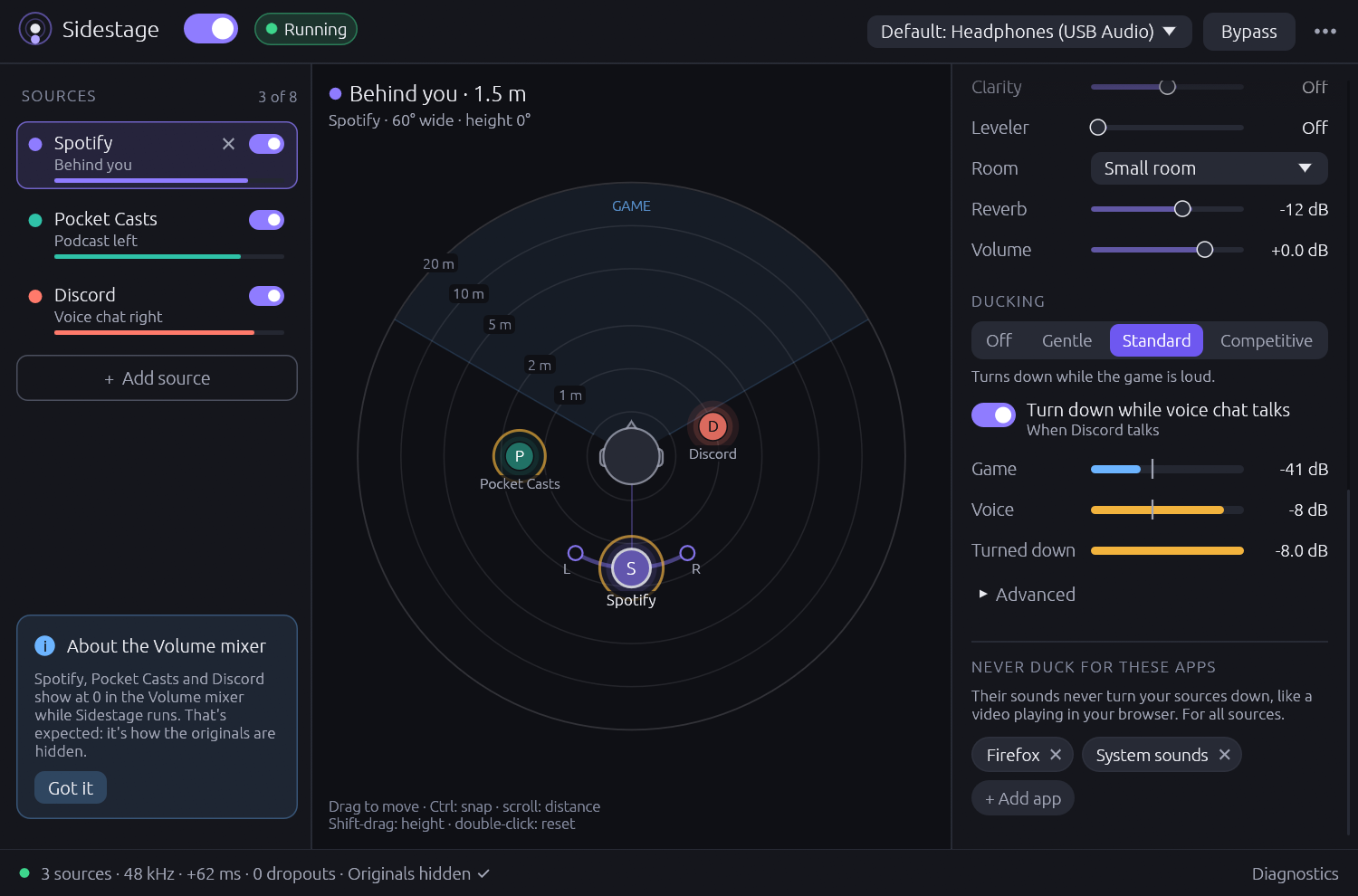
Sidestage listens to everything except the music to decide. Choose how hard: Off, Gentle, Standard or Competitive.
Cue05
No double audio
The app's normal sound is hidden automatically while Sidestage plays it in 3D. If Sidestage is killed, your audio comes back: a helper process restores it on Windows and Linux, and macOS does it by itself. sidestage restore is there if you ever need it.
Cue06
Privacy
There is no network code in Sidestage at all. No telemetry, no accounts, no update checks. Audio is processed in memory and never recorded.
NextNew07
New · coming nextNew
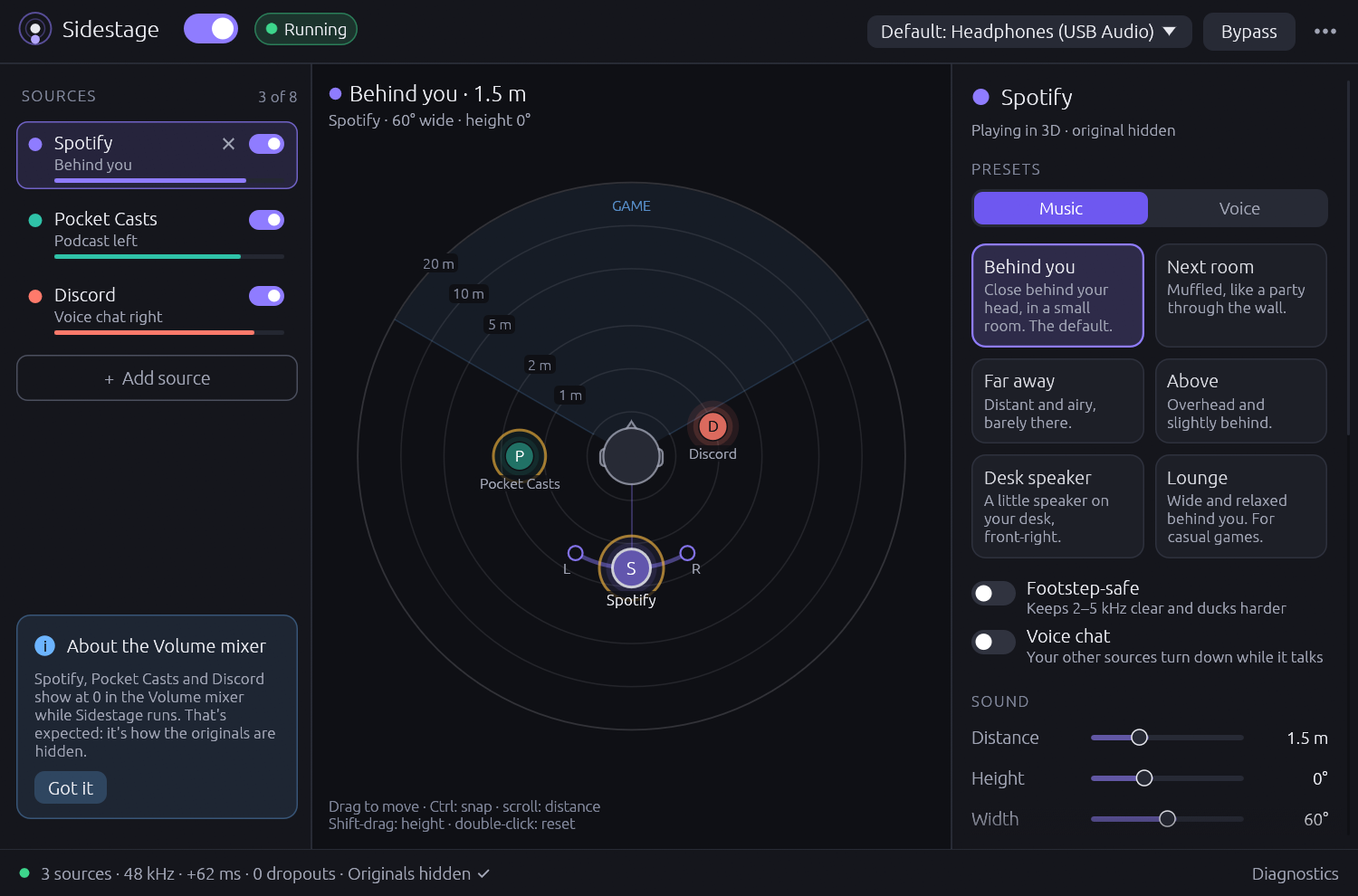
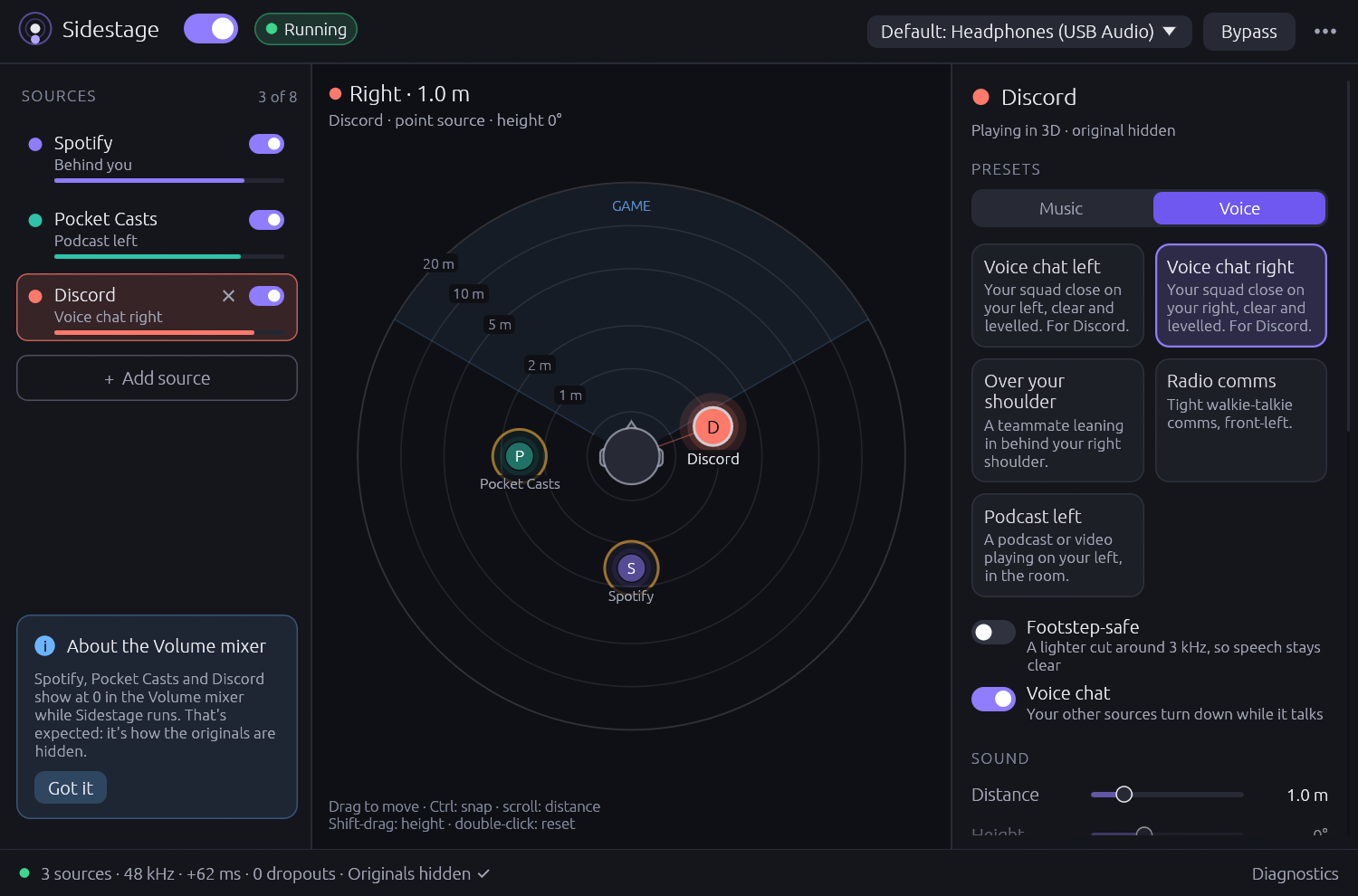
Each source gets its own spot, colour, preset, volume and ducking. Voice presets tuned for Discord come with Clarity and a Leveler that evens out loud and quiet friends: a talker 12 dB quieter comes out within about 4 dB. Voice chat is never turned down for the game; your music and podcasts turn down while someone talks instead. A "Never duck for these apps" list keeps sounds like a video in your browser from turning your sources down, and a limiter keeps several loud sources from clipping.
03 · On real hardware
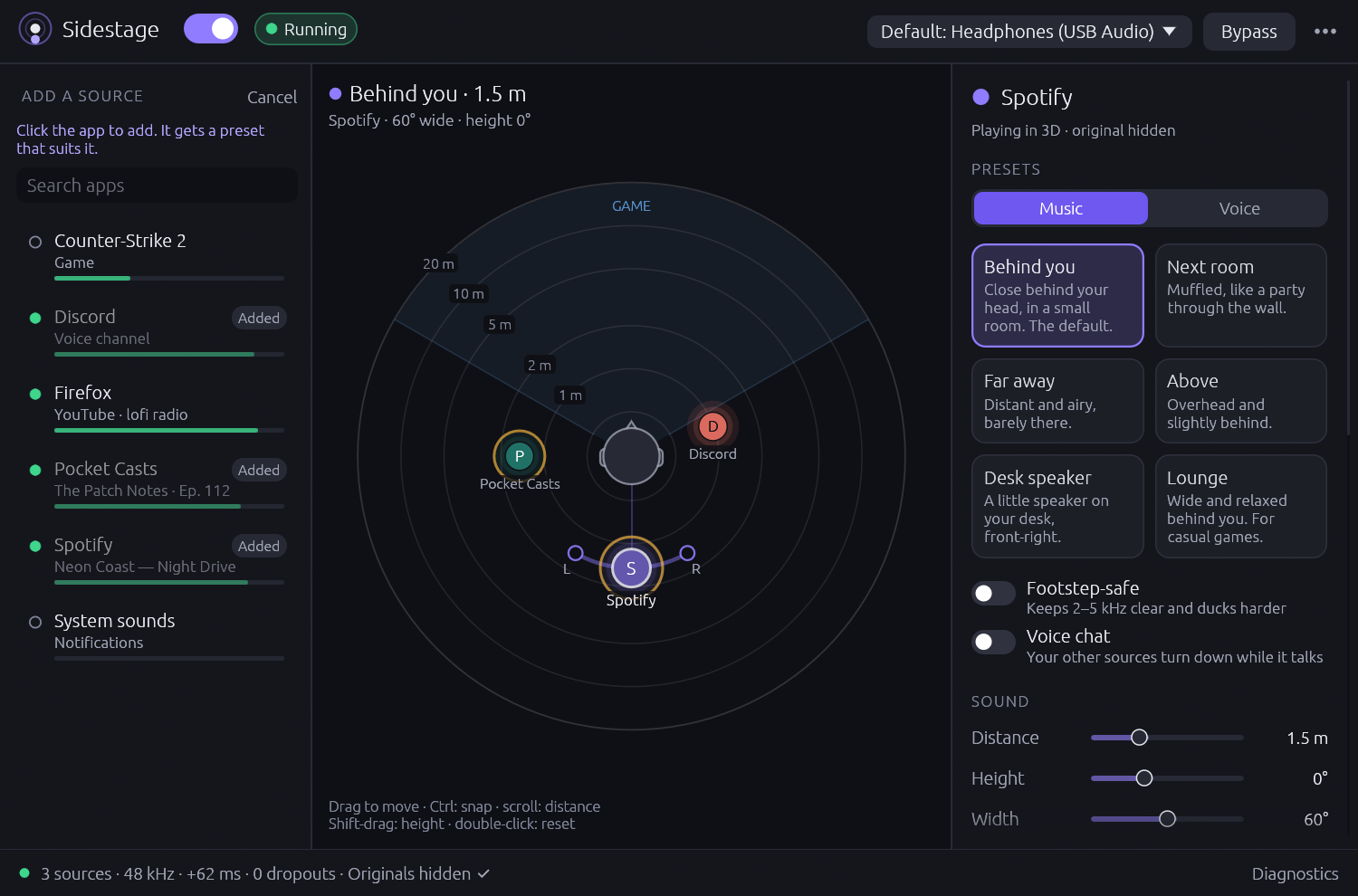
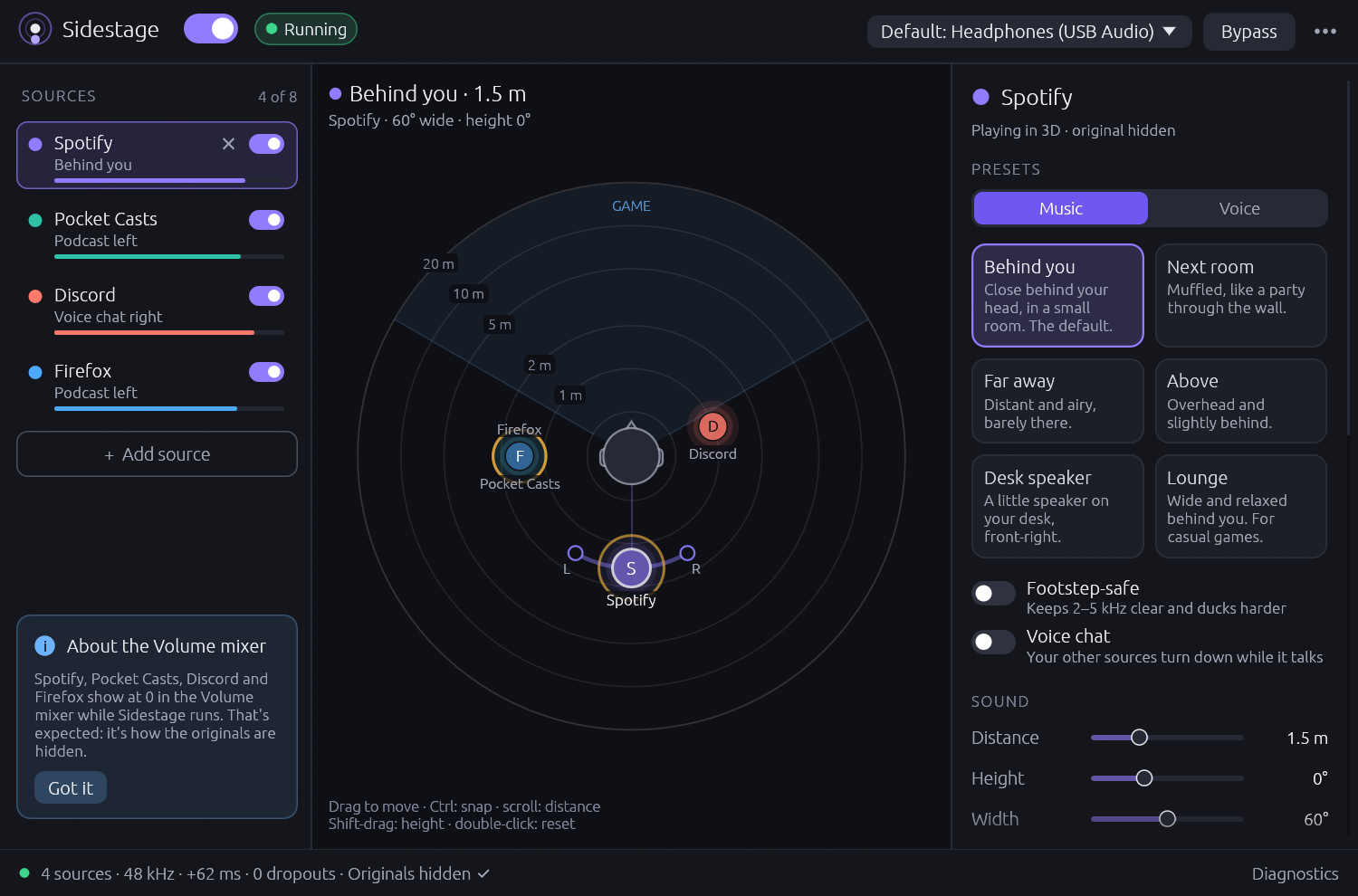
Version 0.1 was tested on Windows 11 with Spotify spatialized while playing Valorant, and 0.2's multi-source engine passed its live tests on real hardware with test tones. Both of these show the real app, not a mock-up.
Coming nextNewProduction stills
In demo mode, with simulated apps: Spotify behind you, Pocket Casts on your left, Discord on your right.
04 · Download
No price, no account, no telemetry. Pick your system; every button goes to the latest release on GitHub. Upgrading from 0.1 keeps your settings: they become your first source.
Windows 11 · Windows 10 2004+ may work
Tested on real hardware, with Spotify spatialized while playing Valorant. Unzip and run sidestage.exe.
Tested on real hardware: 0.1 with Spotify while playing Valorant, and 0.2's multi-source engine with live test tones. Unzip and run sidestage.exe.
Not code-signed yet, so SmartScreen warns you the first time: choose More info, then Run anyway.
Download for WindowsmacOS 14.2 or later · Apple silicon and Intel
Builds and passes its tests in CI, but hasn't been tried on a real Mac yet.
Not notarized yet: open it once, then allow it in System Settings, Privacy & Security. Reports are very welcome.
Download for macOSx86_64 · PipeWire or PulseAudio
Builds and passes its tests in CI, but hasn't been tried on a real desktop yet.
If it runs (or doesn't) on your distro, an issue on GitHub helps a lot.
Download for LinuxHeadphones required: binaural 3D doesn't work on speakers. Open source under MIT OR Apache-2.0. Read the code
05 · Questions
Or build it yourself with Rust 1.95 or newer:
$cargo run --releaseNo. Sidestage renders binaural audio, which needs one channel per ear. On speakers the 3D effect falls apart.
Version 0.1 places one. The next update places up to 8 at once, each with its own position and preset, plus voice presets for Discord.
Up to 8 at once, each with its own position and preset. Voice chat gets its own presets, tuned for Discord.
Never. It captures only the apps you choose. The game's audio is not captured, routed or processed, so its footsteps and gunshots keep their exact position and timing.
That is how the originals are hidden on Windows: each source's app is turned down to -120 dB and its captured copy is boosted back by the same amount. Use Sidestage's own volume sliders instead. If Sidestage is killed, a helper process puts the volumes back right away.
Generic head models sometimes confuse front and back. Moving the music a little to one side, or adding distance and room, helps. On Windows, also turn off spatial sound (Windows Sonic, Dolby Atmos or DTS) for your headphones.
A headset in hands-free (microphone) mode switches to low-quality mono, which can't carry 3D audio. Use its stereo mode. On Windows, Sidestage warns you about this.
Only its settings, its logs and small crash-recovery journals that record which app volumes or routes to put back. Audio is processed in memory and never saved, and nothing is sent anywhere.